
We’ve all been there. You buy a new planner or build the perfect Notion setup, feeling like you’ve finally got your life together. Then a few weeks later, it’s collecting digital dust. Sound familiar?
The problem isn’t you. Most weekly planning systems are too complicated to survive real life. This guide shows you a simple system that still works when your week goes completely off the rails.
By the end, you’ll have an easy five-step planning system you can set up in under an hour and actually stick with.
Why Do Most Weekly Planning Systems Fall Apart?
Three things kill a planning habit, and it’s rarely the tool.
- Over-planning. You block every hour of every day, and the first unplanned meeting knocks the whole week sideways. Once the schedule breaks, most people just stop opening the planner.
- No fixed trigger. “I’ll plan when I have time” isn’t a system, it’s a hope. Without a specific day and time, weekly planning competes with everything else and usually loses.
- Planning tasks instead of priorities. A 40-item to-do list feels productive to write and miserable to face. If nothing on the list is ranked, everything ends up equally urgent, which means nothing actually is.
A weekly planning system that sticks solves for all three at once: fewer decisions, a fixed cue, and a short list of things that actually matter.
- Read Also: Best Second-Brain Systems Compared: Notion, Obsidian, and Logseq
- Read Also: A Task System for People Who Have Tried Every App and Nothing Works
What Does a Weekly Planning System That Sticks Actually Look Like?
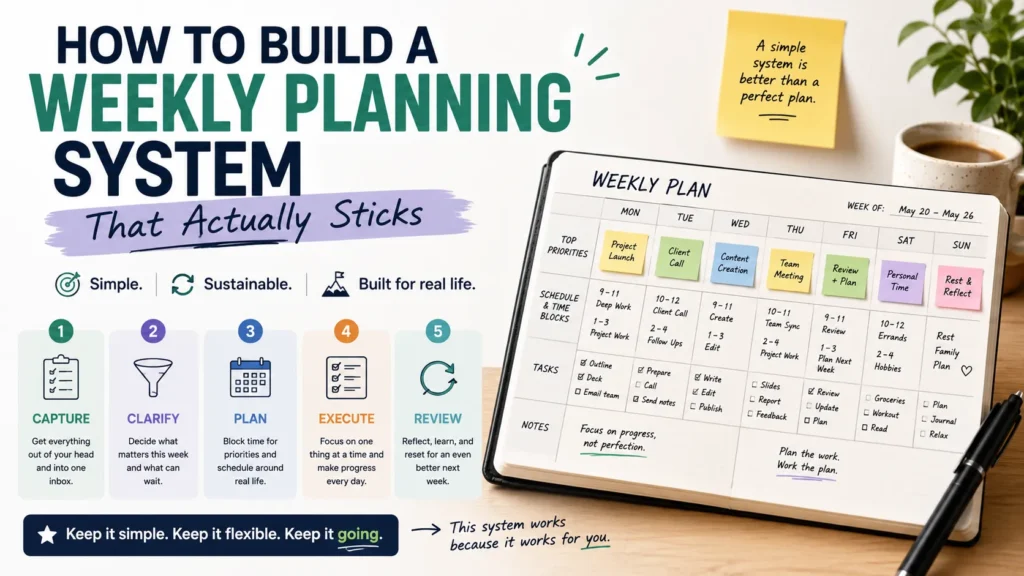
Five parts, done in roughly 30 minutes, at the same time every week.
1. Pick One Anchor Time
Sunday evening or Monday morning both work. What matters is that it’s the same slot every week, tied to something that already happens, like your first coffee or your commute home. Habit research calls this a cue, and it’s the piece most DIY systems skip entirely.
2. Do a Two-Minute Brain Dump
Before you plan anything, get whatever’s rattling around your head out of it. Open a blank note and write down every task, worry, and half-finished idea for 90 seconds. Don’t sort it yet. The point is just to clear working memory so the planning that follows isn’t competing with a mental backlog.
3. Pick Three Priorities, Not Thirty Tasks
Look at your brain dump and your calendar, then choose three outcomes for the week, not three tasks. “Ship the client proposal” is an outcome. “Open Google Docs” is not. Three is small enough to actually finish and big enough to matter. If a fourth thing feels urgent, ask whether it can wait, get delegated, or get cut.
4. Time-Block the Priorities First, Everything Else Second
Put your three priorities on the calendar before anything else goes on it, ideally in your highest-energy hours. Meetings and admin work fill in around them, not the other way around. This single reordering is the difference between a week that runs you and a week you run.
5. Run a Five-Minute Weekly Review
At the end of the week, before you plan the next one, ask three questions: What actually got done? What kept sliding? What made this week harder or easier than expected? The review is the step almost everyone skips, and it’s the one that makes the whole system self-correcting instead of static.
What a Sample Week Actually Looks Like
Abstract advice is easy to nod along to and hard to copy. Here’s what the five-part system looks like for someone juggling a full-time job and a side project.
Sunday, 6:30 PM, right after dinner: fifteen minutes of brain dump, then a look at next week’s calendar. Three priorities get written on a sticky note stuck to the laptop: finish the client deck, hit three workouts, and reply to the two emails that have been sitting for a week.
Monday morning, the deck work gets a 90-minute block from 9:00 to 10:30, before Slack notifications start piling up. Workouts go on the calendar for Tuesday, Thursday, and Saturday, not “whenever there’s time,” because “whenever” rarely shows up. The two overdue emails get five minutes on Monday at 8:45, before anything else.
Thursday is left mostly open. No pre-scheduled deep work, just room for whatever Monday’s plan didn’t account for, because something always comes up.
Sunday again, before the next brain dump: what got done (the deck, two of three workouts), what slid (one email, still), and why (it needed input from someone else who was out sick). That last detail changes next week’s plan. The email gets rescheduled with a note to follow up by Wednesday instead of waiting.
Nothing here requires a $40 planner or a color-coded dashboard. It requires the same 30 minutes, on the same day, five weeks running.
Weekly Planning Methods Compared
Not every method fits every schedule. Here’s how the common approaches stack up.
| Method | Best for | Setup time | Main risk |
| Paper planner (Full Focus, Passion Planner) | People who want tactile, low-distraction planning | Low |
Easy to lose or forget on travel days
|
| Notion/digital dashboard | People already living in their apps and calendars | High initially |
Customization becomes its own time sink
|
| Simple 5-step system (above) | Anyone who’s tried and abandoned a more complex system | Low |
Requires real discipline on the fixed weekly cue
|
| Time-blocking only, no weekly review | People who want structure without a full ritual | Low |
Drifts without a check-in; hard to spot patterns
|
If you’ve burned out on an overbuilt digital dashboard before, the simple system is usually the better starting point. You can always add tooling later once the habit itself is solid.
How Do You Keep a Weekly Planning Habit From Fading After a Month?
Most planning habits don’t die from a bad system, they die from a missed week that never gets rebooted. A few things help:
- Keep the anchor time non-negotiable for the first six weeks. After that, occasional flexibility won’t break it.
- Leave one buffer day. A Thursday with nothing pre-scheduled absorbs the inevitable fires without wrecking your priorities.
- Watch your energy, not just your calendar. Scheduling deep work during your afternoon slump guarantees you’ll skip it.
- Miss a week? Just resume next Sunday. Don’t try to “catch up” retroactively, that’s how the whole habit unravels.
A field study on structured weekly planning found it reduced after-work rumination and left people with fewer carried-over unfinished tasks, but only when the planning was done consistently, not sporadically. Consistency is doing more work here than any specific template.
- Read Also: How to Build a “Brain Dump” System (Works in Any Tool)
- Read Also: Digital Habit Tracking Without Relying on Streaks
Frequently Asked Questions
How long should weekly planning take?
Thirty to forty-five minutes is enough for most people. If it’s regularly taking over an hour, the system’s probably too complicated.
What’s the difference between weekly planning and daily planning?
Weekly planning sets direction and priorities; daily planning decides what happens in the next 24 hours within that direction. You need both, and neither replaces the other.
Should I use a paper planner or a digital one?
Whichever one you’ll actually open. Paper tends to stick for people prone to app-hopping; digital tends to win for people who live in their calendar anyway.
Do I need a weekly review if I already do daily planning?
Yes. Daily planning tells you what to do today. Only a weekly review shows you the pattern across five or six days, like the same task sliding for the third week running.
Final Thoughts
A weekly planning system doesn’t need to be elaborate to work, it needs to survive contact with a bad week. Pick one anchor time, dump your head clear, choose three priorities instead of thirty tasks, block them first, and close the loop with a five-minute review. Run that five-part cycle for six weeks straight before you decide whether it’s working. Most people never give a system that long, which is usually why it never gets the chance to stick.
