Category: Neurodivergent Tech Workflows

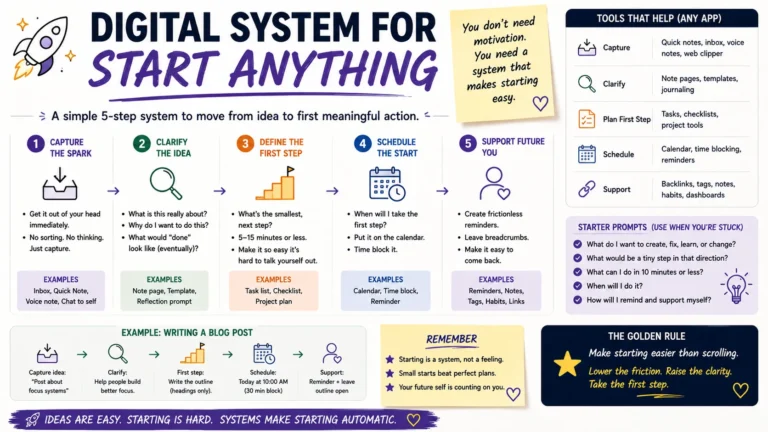
  • Breaking Down Big Projects Without Overwhelm

    Breaking Down Big Projects Without Overwhelm

    You open your to-do list, see “launch the website” or “plan the move” sitting there in one lonely line, and close the laptop again. Sound familiar? A 2025 look at ADHD coaching data found that vague, oversized tasks are one of the top reasons people freeze before they even start.

    The problem usually isn’t motivation. It’s that your brain can’t find a door into the task. When a project stays one giant blob, there’s no obvious first move, so you stall, scroll, or reorganize your desk instead. Learning how to break down a big project into smaller steps fixes that, and it’s a skill, not a personality trait.

    This guide walks through why big projects trigger overwhelm in the first place, and gives you a practical process for turning “revamp the website” into a list you can actually start today.

    Why Do Big Projects Feel So Overwhelming?

    Your working memory can only hold so much at once, roughly four to seven items according to most cognitive research. A big project doesn’t fit in that space. It arrives as a fuzzy cloud of deadlines, dependencies, and half-formed steps, and your brain treats that ambiguity as a threat rather than a task.

    That’s why “clean the garage” feels heavier than it should. The task itself isn’t hard. What’s hard is holding twenty invisible sub-decisions in your head at the same time: where to start, what to keep, where the donation pile goes, whether you need bins. Once you write those decisions down as separate lines, each one gets easy. The overwhelm was never about effort. It was about the missing map.

    There’s also a timing piece to this. Big, undefined tasks sit further away from any payoff, so your brain has less reason to engage with them right now. A single email reply pays off in two minutes. “Relaunch the brand” pays off in three months, if it pays off at all in your head today. Shrinking the project pulls the reward closer, which is a big part of why a broken-down list actually gets worked on instead of just admired from a distance.

    How Do You Break a Project Into Smaller Steps?

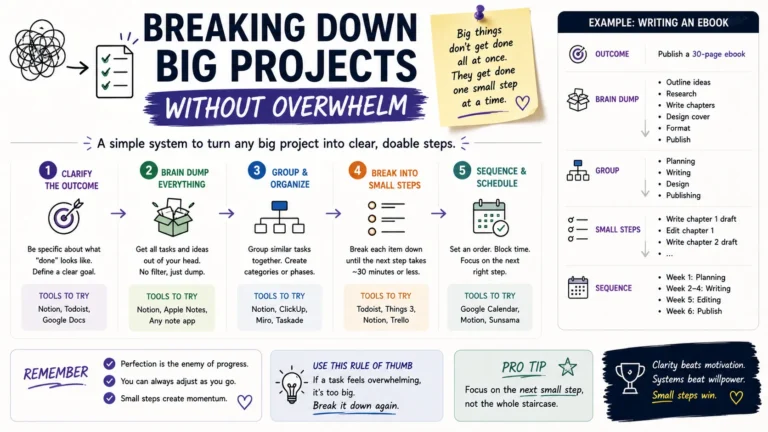
    Start by writing down the finished result in one plain sentence, then work backward.

    1. Define the actual outcome. Not “improve the website,” but “publish 10 revised product pages by September 1.” A vague goal produces vague steps.
    2. Brain-dump everything that has to happen, in no particular order. Get it out of your head and onto paper before you try to organize it.
    3. Group the dump into phases. Research, drafting, review, and launch, for example.
    4. Shrink each phase into tasks small enough to finish in one sitting. If a task takes more than 90 minutes or you can’t picture doing it, split it again.
    5. Order the tasks by dependency, not by importance. Some steps can only happen after others; figure out that chain before you worry about priority.
    6. Assign a next action to the very top item. Not “start research,” but “open Google Docs and list five competitor sites.”

    A task like “write the report” stays paralyzing because it hides five decisions inside one label. Broken apart, it looks more like this: outline the sections, draft the intro, pull three supporting stats, write section one, proofread. Each piece is small enough that starting doesn’t require willpower, just fifteen minutes.

    Vague Task
    Broken-Down Version
    Plan the move
    Get 3 moving quotes, book a date, pack the closet, label boxes by room
    Write the report
    Outline sections, draft intro, pull supporting data, write section 1, proofread
    Launch the website
    Finalize copy for homepage, choose 5 stock images, test checkout flow, schedule launch email
    Redo the budget
    List all expenses, categorize by fixed/variable, set 3 savings targets, pick a tracking app

    What’s the Right Size for a Task?

    A good rule of thumb: if you can’t picture the physical first move, the task is still too big. “Get healthier” isn’t a task, it’s a direction. “Walk 20 minutes on Tuesday and Thursday” is a task. Coaches who work with ADHD clients often use a simple test here: if a step still feels vague after you’ve broken it down once, break it down again until it does.

    Aim for chunks that take somewhere between 15 and 90 minutes. Shorter than that and your list turns into busywork with too many entries to track. Longer than that and the old overwhelm creeps back in, because a 4-hour block still has hidden sub-steps buried inside it.

    How Do You Stay on Track Once the Project Is Broken Down?

    Breaking a project apart is only half the job. The other half is tracking progress without losing the thread.

    • Use one system, not five. A single running list in Notion, Trello, or even a plain notebook beats scattered notes across apps and sticky notes.
    • Check off small wins visibly. Crossing an item off a physical or digital list gives a real, if tiny, sense of momentum, and that momentum is what keeps you moving to the next item.
    • Batch similar tasks. Grouping all your emails, all your calls, or all your writing tasks into one block cuts down on the mental cost of switching gears.
    • Review weekly, not daily. A short Friday check-in to reorder next week’s tasks keeps the plan realistic without turning planning itself into a time sink.
    • Build in a buffer. Estimate how long a phase will take, then add 20%. Almost every project runs long, and padding the schedule up front avoids the late-stage scramble.

    If you find yourself avoiding a specific task for more than a couple of days, treat that as information. It usually means the task is still too big, too vague, or missing a clear first action, not that you’re lacking discipline.

    Take “update the client proposal,” a task that sat untouched on one freelancer’s list for nine days before she finally split it into “reread the old proposal,” “swap in new pricing,” and “send for review.” Each piece took under twenty minutes. The task hadn’t gotten any smaller in reality; it had just been named badly. That’s the pattern worth watching for in your own list: repeated avoidance almost always points back to a task that needs one more round of breaking down, not one more ounce of willpower.

    Final Thoughts

    Big projects don’t get less overwhelming because you push harder. They get less overwhelming because you make them smaller. Write down the real outcome, brain-dump the pieces, shrink each one until the first move is obvious, and track progress in a single place you actually check.

    Start with just one project on your plate right now. Pick the task at the very top, break it into a step you could finish in the next twenty minutes, and do that one thing before you do anything else.

    Frequently Asked Questions

    Why do I procrastinate on big projects even when I have plenty of time?

    Procrastination on large projects is usually a signal that the first step isn’t clear, not a lack of time or motivation.

    How many steps should a project be broken into?

    There’s no fixed number. Keep splitting a task until each piece is something you can start without further thinking, generally 15 to 90 minutes of focused work.

    What tools help with breaking down projects?

    Simple task managers like Trello, Notion, Todoist, or even a paper notebook work well.

    Is breaking down tasks especially helpful for ADHD?

    Yes. Executive function research consistently shows that adults with ADHD manage large, multi-step projects better when tasks are chunked into small, concrete actions with clear starting points, since this reduces the working-memory load that triggers avoidance.

  • Managing Time Blindness with Digital Tools: A Step-by-Step Guide

    Managing Time Blindness with Digital Tools: A Step-by-Step Guide

    You checked your phone. It said 2:14. You checked again, certain only a few minutes had passed, and it said 3:40. Nothing about that hour felt real. That gap between how time feels and how time actually moves is time blindness, and if it happens to you often, you already know how much damage it does to deadlines, appointments, and your own sense of trust in yourself.

    Time blindness shows up most often with ADHD, but it isn’t limited to it. Anyone with a busy, distraction-heavy schedule can lose track of how long a task takes or how much time is left before the next commitment. The good news is that your phone and computer, the same devices that often make focus harder, can also be turned into a working set of time blindness tools. This guide walks through what actually helps, app by app, habit by habit.

    What Is Time Blindness, Exactly?

    Time blindness is difficulty sensing the passage of time without an external cue. It’s not laziness and it’s not a character flaw. Occupational therapists describe it as a breakdown in executive function, the brain’s internal “clock” that’s supposed to estimate duration and prompt transitions between tasks.

    For someone without time blindness, an internal sense nudges them: it’s probably been twenty minutes, I should wrap this up. For someone with it, that nudge doesn’t fire. Twenty minutes and two hours can feel identical from the inside. That’s why external, visual, and auditory tools matter so much here. They replace the internal clock the brain isn’t reliably producing.

    Common signs include:

    • Arriving very late or absurdly early, with no in-between
    • Losing an entire afternoon to a task that “felt like ten minutes”
    • Chronic difficulty estimating how long errands, chores, or work will take
    • Missing appointments despite genuinely intending to be there
    • A pattern of last-minute cramming, even for things planned weeks ahead

    How Do Digital Tools Actually Help With Time Blindness?

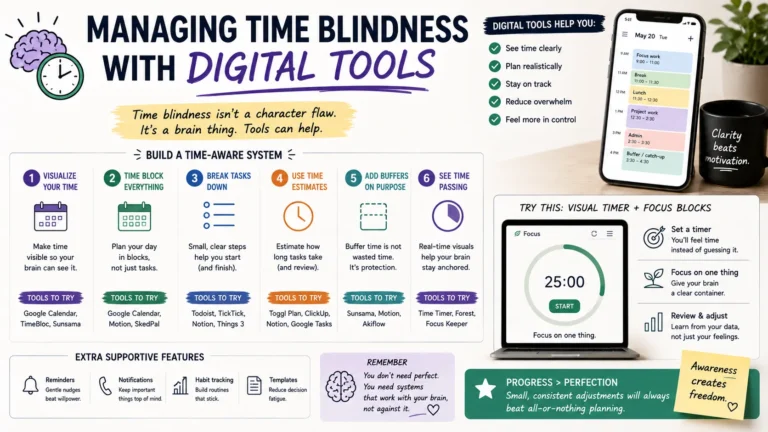
    Digital tools work by externalizing time. Instead of relying on a felt sense of duration, you outsource that job to something you can see, hear, or feel buzz in your pocket. The goal isn’t a single miracle app. It’s stacking a few tools that cover different weak points: starting tasks, tracking duration, and remembering commitments.

    Below is a comparison of the main tool categories worth trying, based on what shows up most often in ADHD and productivity communities.

    Tool Type Best For Example Apps Cost
    Visual timers Making elapsed time visible during a task Time Timer, Time Blindness Visualizer Free–$35
    Pomodoro apps Breaking work into focus/break intervals Pomofocus, Forest Free–$4/mo
    Digital calendars Scheduling and pre-commitment Google Calendar, Fantastical Free–$5/mo
    Task time estimators Predicting how long a task will take Goblin Tools, Todoist Free–$5/mo
    Widget-based reminders Keeping time and tasks visible at a glance iOS/Android widgets Free

    Visual Timers

    A number on a screen doesn’t register the same way a shrinking shape does. Visual timers, like a ring or wedge that physically gets smaller, give your brain something closer to a felt sense of time running out. This matters because reading “14:32 remaining” still requires interpretation, and interpretation is exactly the step that time blindness disrupts.

    Set one for any task with a real endpoint: a work sprint, a shower, a phone call you know tends to run long. The visual cue does the estimating for you.

    Pomodoro and Focus Apps

    Pomodoro apps split work into short, timed intervals, usually 25 minutes on and 5 minutes off. For time blindness specifically, the value isn’t really the productivity technique. It’s the forced checkpoint. Every 25 minutes, something interrupts you and asks: are you still on task, and how much time has actually gone by? Apps like Pomofocus or Forest add a small visual or gamified element, which tends to hold attention better than a plain kitchen timer app.

    Digital Calendars and Pre-Commitment

    A calendar only helps with time blindness if it’s loud enough to be noticed. Passive entries that sit quietly in an app don’t do much. What works better is stacking alerts: a reminder the night before, one an hour before, and one at the moment you need to leave. Google Calendar and Fantastical both support multiple alerts per event, and that redundancy matters more than which app you pick.

    Buffer time is worth building in deliberately too. If a meeting starts at 10, set the calendar block to start at 9:45, with the label “leave now” rather than the meeting’s actual name. That small rename does a lot of the cognitive work for you.

    Task Time Estimators

    One of the sneakier parts of time blindness is chronically misjudging how long things take, usually underestimating. Tools like Goblin Tools include an estimator feature: describe the task, and it gives a rough time range based on similar activities. It won’t be perfect, but even a rough anchor is more useful than guessing from scratch, especially for tasks you don’t do often enough to have built intuition around.

    Widgets and Ambient Visibility

    The tools above only work if you actually see them. A reminder buried three taps deep in an app might as well not exist. Home-screen widgets for your calendar, to-do list, and a running clock keep time visible without requiring you to remember to check anything. On iOS and Android alike, this is a five-minute setup that pays off every single day.

    Building a Simple Daily System

    Individual apps help, but the real shift happens when a few of them work together as a routine. Here’s a workable starting setup:

    1. Morning: Open your calendar widget first thing and physically read through the day’s blocks, not just glance at them.
    2. Before each task: Set a visual timer or start a Pomodoro session, even for tasks that feel too small to time.
    3. Before leaving anywhere: Trust the calendar alert, not your own sense of “I have plenty of time.” That sense is exactly what’s unreliable.
    4. End of day: Spend two minutes comparing what you planned against what actually happened. Over a couple of weeks, this reveals your personal blind spots, like consistently underestimating commute time or overestimating how fast you write emails.

    Frequently Asked Questions

    Is time blindness a real medical condition?

    Time blindness itself isn’t a standalone diagnosis, but it’s a recognized and well-documented symptom of ADHD and some other executive function conditions. It reflects a real difference in how the brain processes duration, not a lack of effort.

    What is the best free app for time blindness?

    There’s no single best option, since it depends on which part of time blindness trips you up most. Goblin Tools is a strong free choice for task estimation, Pomofocus for focus intervals, and Google Calendar for scheduling with multiple alerts.

    How long does it take to build a habit around these tools?

    Most people notice a difference within one to two weeks, though building it into an automatic habit tends to take closer to a month. Consistency matters more than finding the “perfect” app on day one.

    Do I need multiple apps, or will one be enough?

    One tool alone rarely covers everything. A calendar handles scheduling, a timer handles duration, and a task estimator handles planning. Most people end up combining two or three rather than relying on a single all-in-one solution.

    Final Thoughts

    Time blindness isn’t something you fix by trying harder to “be more aware.” It responds to structure you can see, hear, and feel, not willpower alone. Start with one tool, a visual timer is usually the easiest entry point, and add a second once the first one has actually stuck. Small, boring consistency beats a perfectly optimized system you abandon after a week.

  • How to Stop Losing Tasks When You Have ADHD (Any App)

    How to Stop Losing Tasks When You Have ADHD (Any App)

    Somewhere in your phone right now, there’s probably a task you swore you’d remember without writing down. Maybe it’s a reply you owe someone, a bill, a thing your kid asked for last Tuesday. If you have ADHD, that task didn’t get lost because you’re careless. It got lost because your brain treats “out of sight” as “doesn’t exist yet.”

    This isn’t really an app problem, even though app store reviews are full of ADHD folks blaming the software. You can hop from Todoist to Notion to a paper planner to Apple Reminders and lose tasks in every single one, because the failure point is almost never the tool. It’s the handoff between the moment a task enters your head and the moment it lands somewhere permanent.

    Below is a system that works whether you’re using a $50-a-year app, a free one, or a stack of sticky notes.

    Why Do People With ADHD Lose Tasks in the First Place?

    ADHD affects working memory, the part of your brain that holds information active while you’re using it. Neurotypical brains can juggle a thought for a few minutes without effort. ADHD brains often lose it in seconds, especially if something else grabs attention in between: a notification, a smell, a random thought about dinner.

    A few specific patterns show up over and over:

    • The task never left your head. You thought about writing it down. Thinking about it felt like enough. It wasn’t.
    • You wrote it somewhere temporary. A sticky note, the notes app, a random Slack message to yourself, and then it got buried under forty other things.
    • You wrote it down correctly, but never looked at that list again. This is the most common one, and it’s rarely talked about. Capture isn’t the hard part for most ADHDers. Review is.
    • The task was written down vaguely. “Follow up with landlord” doesn’t tell your brain what to actually do, so it gets skipped every time you scan the list.

    Task paralysis makes all of this worse. When a list has twelve unsorted items, an ADHD brain often can’t pick where to start, so it picks nothing, and the whole list quietly becomes background noise.

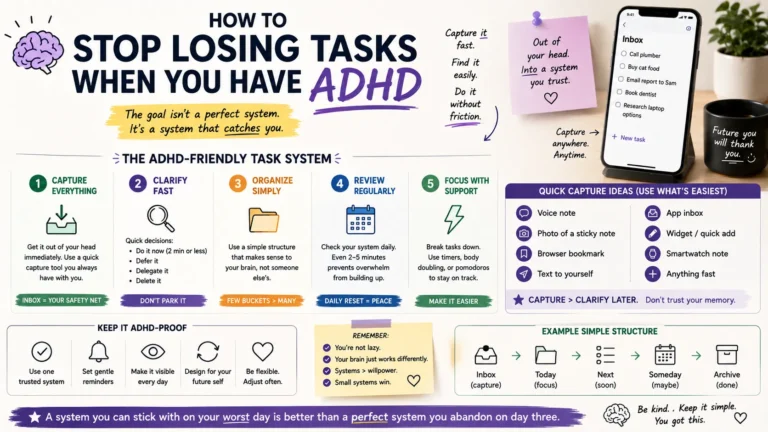
    What Actually Fixes This (Regardless of App)

    Cut the Number of Capture Points to One

    If you’re jotting tasks in your notes app, a notebook, three group chats, and your email drafts folder, you don’t have a task system. You have five half-systems, and half-systems lose things. Pick a single place tasks are allowed to live. It genuinely does not matter which app; what matters is that it’s the only one.

    Capture Immediately, Not “In a Minute”

    The gap between thinking of a task and writing it down is where most tasks die. If your capture tool takes more than about five seconds to open (unlocking your phone, finding the app, tapping through a menu), you will skip it half the time. Voice memos, a widget on your home screen, or a physical notepad on your desk all cut that friction down. Automation tools help here too: a lot of ADHD users set up a quick capture flow with something like Zapier or n8n so a text message, a Slack DM, or even a voice note automatically becomes a task line item, no manual typing required.

    Make Every Task Start With a Verb

    “Landlord” is not a task. “Text landlord about the leaking faucet” is. Vague entries get skipped because your brain has to do extra work just to figure out what “landlord” means before it can act, and ADHD brains routinely skip that extra step. Rewrite tasks the moment you capture them so the very first word tells you what to physically do.

    Build a Forced Daily Review

    This is the piece almost everyone skips, and it’s the one that matters most. A task list you never open is just a graveyard. Set a recurring alarm. Same time every day works better than “whenever I remember.” Spend two minutes scanning the list. You’re not trying to do everything on it. You’re just making sure nothing silently expires.

    Separate “Someday” From “Today”

    Long lists overwhelm ADHD brains into inaction. Keep a short list of what actually needs doing today (three to five items, no more) and a separate holding area for everything else. Anything estimated at ten minutes or under can also just get done the second it’s captured, instead of ever making it onto a list at all. That alone eliminates a surprising chunk of “lost” tasks.

    Comparing Common Capture Methods for ADHD

    Method Friction to Capture Built-In Review Prompt Best For
    Voice memo / voice-to-text Very low No, needs a separate review habit
    Capturing on the move, driving, walking
    Physical notepad Low No
    People who lose focus staring at screens
    Task app with daily reminder Low-medium Yes, if reminders are set
    People who already live on their phone
    Shared notes app (no structure) Low No
    Rarely works alone; needs pairing with a review habit
    Automation flow (text/voice → task app) Very low Depends on app
    People juggling multiple input channels

    No single row in that table is “the answer.” The method that survives long-term is whichever one you’ll actually keep opening after the first week’s excitement wears off.

    How to Pick (or Fix) an App Without Overhauling Your Life

    You don’t need to switch apps to fix a lost-task problem, and doing so is often a form of productive-feeling procrastination. Before you download anything new, add these two things to whatever you’re already using:

    1. A daily recurring alarm that forces a review, not just a notification you can dismiss without reading.
    2. A rule that nothing sits in a “temporary” spot (no sticky notes, no notes-app parking lot) for more than a day before it either gets done or moved into the real list.

    If your current app genuinely can’t support a recurring review reminder, that’s a legitimate reason to switch. Everything else is usually a workflow problem dressed up as a tool problem.

    Frequently Asked Questions

    Why do I keep forgetting tasks even when I write them down?

    Writing a task down solves capture, not review. If you never look at the list again, or the list is long and unsorted, your brain treats it the same as never having written it at all. Pair every written task with a scheduled time to look at the list.

    What’s the best task app for ADHD?

    There isn’t one best app. That’s one of the more misleading ideas floating around ADHD productivity content. What matters more than the app is a low-friction capture step and a forced daily review. A simple app with both of those beats a feature-heavy app with neither.

    Is losing tasks constantly a sign of untreated ADHD, or just disorganization?

    Occasional forgetfulness happens to everyone. A consistent pattern of losing tasks despite genuinely trying different systems is more specific to how ADHD affects working memory and task initiation. If it’s affecting work, relationships, or daily functioning, it’s worth bringing up with a doctor or therapist rather than only trying app after app.

    Can automation tools like Zapier or n8n actually help with this?

    Yes, particularly for the capture step. Setting up a flow where a text message, voice note, or email automatically drops into your task app removes a manual step that’s easy to skip. It won’t fix the review habit on its own, though. That part still has to be built manually.

    The Takeaway

    Losing tasks isn’t a willpower failure, and it isn’t really a sign you picked the wrong app. It’s what happens when there’s no reliable bridge between the moment a thought shows up and the moment it lands somewhere you’ll actually see it again. Fix the capture step, fix the review step, and most ADHD task-loss problems shrink dramatically, no matter what’s running on your home screen.