
You set the alarm. You wrote the note. You even added a follow-up ping ten minutes later, just to be safe. And somehow it’s 4 p.m. and the dentist appointment is a missed call and an apologetic text.
If that sounds familiar, the problem was never that you don’t care enough. Most reminder systems for ADHD fail for a specific, well-documented reason: they’re built for brains that process time and attention differently than yours does. A sticky note assumes you’ll look at it before it becomes wallpaper. A phone alert assumes one buzz is enough to interrupt whatever you’re mid-task on. Neither assumption holds up for long against an ADHD brain, and that’s not a character flaw, it’s a mismatch between the tool and the wiring.
This isn’t another list of the same five productivity apps. It’s a breakdown of why ordinary reminders stop working, and what to build instead so the next reminder actually lands.
Why Do Normal Reminders Fail for ADHD?
Three things are working against you at once, and none of them are about effort.
Working memory drops the ball. ADHD affects the brain’s ability to hold information active while doing something else. You read the reminder, you agree with it, and thirty seconds later, while you’re pouring coffee, it’s gone. Not ignored — gone.
Time blindness scrambles the clock. Researcher Russell Barkley describes ADHD time perception as split into “now” and “not now.” If a task isn’t happening this second, it barely registers as real. A reminder that fires an hour ahead of a meeting doesn’t feel urgent; it feels theoretical, right up until it’s suddenly extremely late.
Notification blindness sets in fast. The same buzz, the same banner, the same twenty-minute-early nag every day, and your brain learns to filter it out the way it filters out a ticking clock. Novelty matters more than volume. A louder alarm doesn’t fix a system your brain has already tuned out.
Once you see the mechanism, the fix stops being “try harder” and starts being “change the format.”
- Read Also: A Digital System for Days When You Can’t Start Anything
- Read Also: Breaking Down Big Projects Without Overwhelm
What Actually Makes a Reminder Work?
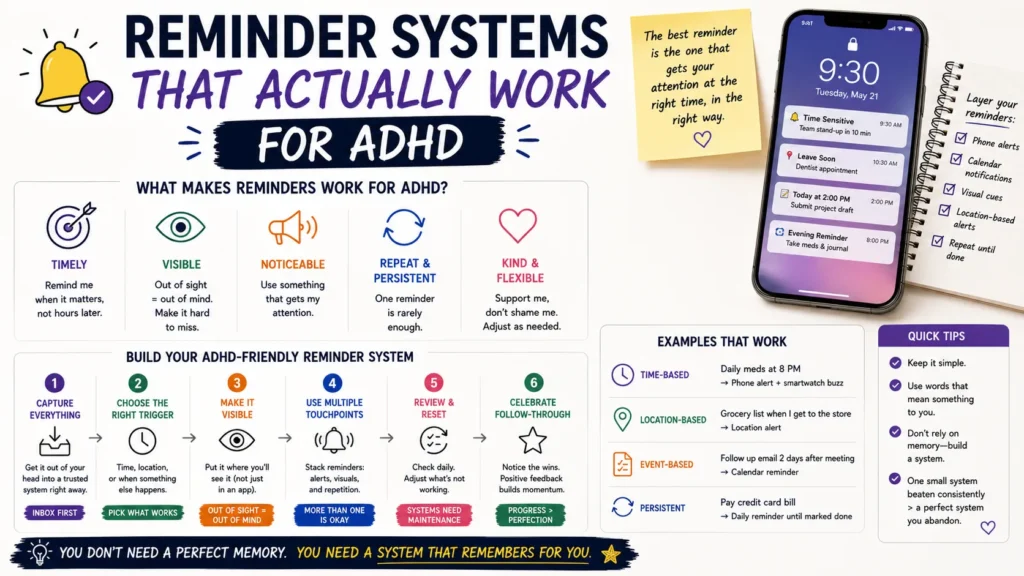
Four traits show up again and again in strategies that stick, based on both clinical guidance and what ADHD adults report actually using long-term.
1. It arrives in context, not just on time
A reminder to “call the pharmacy” at 2 p.m. is useless if you’re in a meeting at 2 p.m. Location- and activity-based triggers work better than pure clock time: a note taped to your car keys, a phone reminder tied to arriving at a location, an alarm labeled for the exact moment you can act, not a vague hour beforehand.
2. It makes time visible, not abstract
Digital countdowns rarely help because a number ticking down still lives inside a screen you’ve learned to tune out. A Time Timer, the kind with a red disk that visibly shrinks, gives your eyes something a digital clock can’t: a shape changing in real space. Analog clocks work for the same reason — the sweep of the hands is something you register peripherally, without having to consciously check.
3. It changes, so your brain can’t autopilot past it
Identical alerts become wallpaper within days. Reminders that rotate wording, swap in a different image, or ask for a quick response (Done, Later, Skip) force a flicker of attention that a static banner never gets. This is the single biggest reason polished-looking reminder apps stop working after week one: nothing about them changes.
4. It stacks, instead of relying on one shot
One alarm is a coin flip. A cluster of three, spaced out (a “start getting ready” alert, a “leave now” alert, and a physical timer running in the background) gives your attention multiple chances to catch the same event before it’s missed entirely.
Comparing the Main Reminder Formats
No single format solves everything. Most ADHD adults end up running two or three of these at once.
| Format | Best for | Weak spot |
| Phone/app alerts (Due, Todoist, Apple Reminders) | Portable, searchable, syncs across devices |
Habituates fast; easy to swipe away half-asleep
|
| Visual timers (Time Timer, hourglass) | Making elapsed time physically visible |
Doesn’t help with reminders hours or days out
|
| Analog clocks placed in every room | Passive, ambient time-awareness |
Requires you to glance at it; no active alert
|
| Location-based triggers | Reminders tied to arriving/leaving a place |
Needs a phone with location permissions on
|
| Body doubling / accountability partner | Tasks that need real-time follow-through |
Depends on someone else’s availability
|
| Paper + digital hybrid (bullet journal + timer app) | Combines visual engagement with automation |
Takes upkeep; easy to abandon one half
|
The pattern worth noticing: apps are good at storing reminders, but weak at delivering them in a way that breaks through. Physical and visual tools do the opposite. Pairing one of each tends to outperform doubling down on either alone.
Building a System That Survives Week Three
Most systems don’t fail on day one. They fail around week three, once the novelty wears off and the reminders start blending into background noise. A few adjustments make that less likely.
- Label reminders by action, not by vibe. “Reminder” tells your brain nothing. “Pack bag, start walking to the bus stop” tells it exactly what to do the second it fires.
- Set the alert for when you can act, not when the event happens. A reminder that pops up mid-meeting is a reminder you’ll dismiss without reading.
- Rotate the format every few weeks. If phone alerts have gone quiet, switch the loudest one to a physical timer for a while, then swap back.
- Give yourself a buffer, not a deadline. Setting the alert 15–20 minutes earlier than the “real” time absorbs the moments where you get sidetracked mid-transition.
- Stop blaming the miss on willpower. A missed reminder usually means the format stopped working, not that you failed. Change the tool before you assume the problem is you.
None of this requires buying five apps. It requires picking two formats that hit different senses (one visual, one alert-based, say) and refreshing them before they go stale.
- Read Also: How to Stop Losing Tasks When You Have ADHD (Any App)
- Read Also: Managing Time Blindness with Digital Tools: A Step-by-Step Guide
Frequently Asked Questions
Are visual timers actually more effective than phone alarms for ADHD?
For tasks involving a stretch of time, like a work session or a chore, yes; a shrinking disk or draining hourglass makes elapsed time physically visible in a way a phone screen doesn’t.
What’s the best reminder app for ADHD?
There isn’t one universal answer. Apps like Due are built for simple, insistent, one-tap reminders. Todoist suits people who also want task management attached.
Does time blindness get better with practice?
Time blindness is a perceptual difference, not a discipline problem, so it doesn’t tend to resolve through willpower or repetition alone.
How many reminders is too many for one event?
Two to three staggered alerts for one event tends to outperform a single reminder without training your brain to tune out the noise the way a barrage of five or six identical pings would.
Where to Go From Here
The goal isn’t a perfect system. It’s one that survives contact with an ordinary Tuesday. Start with one format change this week, maybe swap a phone alarm for a visual timer on your next work session, and see whether it catches your attention differently than what you’ve been running on autopilot.
