
You bookmark an article, forget why it mattered, and three weeks later you are back on Google looking for the exact same answer.
Classic chaos. A second brain system fixes that by turning your notes into an external memory you can actually trust.
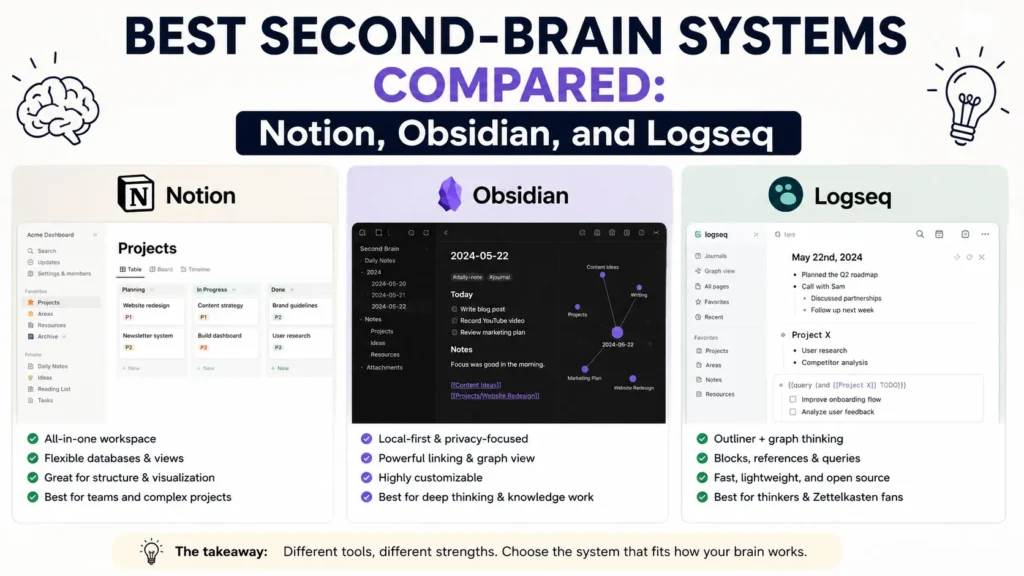
Notion, Obsidian, and Logseq are the big three people fight over, and honestly, they all work differently.
Pick the wrong one, and your note-taking life can turn into a ghost town fast.
This guide breaks down how each one really works, where each one falls apart, and who it is actually built for.
We tested all three with the same setup: daily notes, project pages, and a research stash of about 400 notes.
The differences showed up almost immediately.
What Makes a Second Brain System Actually Work?
The idea traces back to Tiago Forte’s PARA method (Projects, Areas, Resources, Archives), though plenty of people build second brains without ever reading his book. The core promise is the same regardless of the app: offload information so your working memory can focus on decisions instead of recall.
A system earns the name “second brain” when it does three things well.
- Capture is frictionless. If saving a note takes more than a few seconds, you’ll stop doing it within a week.
- Notes connect to each other. Isolated notes in folders are just a filing cabinet. A second brain links ideas so old notes resurface when they’re relevant.
- Retrieval beats organization. You don’t need a perfect folder structure if search and backlinks can find the note for you.
Notion, Obsidian, and Logseq all claim to do this. They disagree on how.
- Read Also: How to Build a Weekly Planning System That Actually Sticks
- Read Also: A Task System for People Who Have Tried Every App and Nothing Works
How Does Notion Handle a Second Brain?
Notion is a cloud-based workspace built around databases, not files.
Pages can hold text, but also tables, kanban boards, and linked records, which makes it the closest thing to a project management tool with a notebook bolted on.
For a second brain, that means you can build a PARA system with actual filters and views: a Projects database that rolls up tasks, an Areas database tagged by life domain, a Resources database you can filter by topic.
If you like structure and you’re already comfortable with spreadsheets, this clicks fast.
The tradeoff is speed. Notion pages load over the network, and heavy databases with hundreds of entries can lag, especially on mobile. It’s also cloud-only by default, so if Notion’s servers go down, so does your second brain.
How Does Obsidian Handle a Second Brain?
Obsidian stores everything as plain Markdown files on your own device. There’s no proprietary format, no server dependency, and no subscription required for personal use. The core feature that makes it a second-brain favorite is bidirectional linking: when you type [[note name]], Obsidian creates a link both ways, and a graph view shows how your notes cluster together.
This is where Zettelkasten-style thinking shines. Instead of filing a note under one folder, you link it to five related ideas, and months later you rediscover the connection through the graph instead of hunting through a directory tree.
Obsidian’s learning curve is steeper than Notion’s. There’s no built-in database view unless you install a community plugin like Dataview, and the interface rewards people who are willing to tinker. But because your notes are just files, you can back them up anywhere, sync them however you want, and never worry about a company shutting down and taking your archive with it.
How Does Logseq Handle a Second Brain?
Logseq is the outliner of the three. Every note is built from nested bullets rather than freeform paragraphs, and the app defaults to a daily notes page where you dump whatever’s on your mind, then link pieces of it to permanent topic pages later.
If your thinking is naturally list-shaped, this workflow is fast. You don’t decide where a thought “belongs” before writing it down; you capture it in today’s log and connect it afterward. Logseq is also free and open source, stores files locally like Obsidian, and supports the same [[wiki-link]] syntax.
The rough edges show up in polish. Logseq’s mobile app and sync have historically lagged behind Obsidian’s, and the plugin ecosystem is smaller. For a lot of users that’s a fair trade for paying nothing and owning their data outright.
Which Second-Brain System Fits Your Thinking Style?
| Notion | Obsidian | Logseq | |
| Storage | Cloud, proprietary | Local Markdown files |
Local Markdown/Org files
|
| Structure | Databases, pages | Linked documents, graph view |
Outliner, daily notes
|
| Learning curve | Low to moderate | Moderate to steep | Moderate |
| Offline use | Limited (needs sync) | Full offline support |
Full offline support
|
| Price | Free tier; paid plans from ~$10/user/month | Free for personal use; sync/publish are paid add-ons |
Free, open source
|
| Best for | Teams, project tracking, database-style thinkers | Long-term archives, Zettelkasten, people who like tinkering |
Fast daily capture, list-shaped thinkers, privacy-first users
|
If you’re choosing between Notion and Obsidian specifically: Notion wins for collaboration and structured project data, Obsidian wins for a private, durable knowledge archive you fully own. Logseq sits closest to Obsidian in philosophy but trades some polish for a faster daily-capture habit and a zero-dollar price tag.
What Happens If You Switch Tools Later?
This is the question most comparisons skip, and it’s the one that actually matters two years into a second-brain system. Notion locks your structure into its database format. Move away, and your relational properties, rollups, and formulas don’t survive the export; you’re left with flat Markdown files and a rebuild ahead of you.
Obsidian and Logseq both avoid that trap because your vault is just a folder of .md files sitting on your hard drive. Delete the app tomorrow and your notes still open in any text editor. That’s not a small detail. A second brain you’re building for the next decade should survive the death of whichever company made the software.
Cost adds up differently too. Notion’s paid plans run from roughly $10 to $20 per user per month depending on tier, which is fine for a team but adds up over years for a solo user. Obsidian is free for personal use, with optional Sync and Publish add-ons priced around $8 to $16 a month if you want them. Logseq stays free across the board, including its own sync feature, though it launched later and still lags Obsidian’s in reliability.
Frequently Asked Questions
Is Notion or Obsidian better for a second brain?
Notion is better if you’re collaborating with a team or want database-style views of your notes. Obsidian is better for a personal, long-term knowledge archive that stays under your control, since it stores files locally rather than on someone else’s servers.
Do I need to learn Markdown to use Obsidian or Logseq?
Not really. Both apps let you type normally and handle the formatting behind the scenes for bold, links, and headers. Knowing basic Markdown syntax helps once you want more control, but it’s not a prerequisite to get started.
Can I switch from Notion to Obsidian later without losing my notes?
Yes, though it takes some cleanup. Notion can export pages as Markdown, and you can import that export into Obsidian’s vault folder. Database views and relational properties don’t translate directly, so expect to rebuild those manually.
What is the PARA method, and do I need to follow it exactly?
PARA stands for Projects, Areas, Resources, and Archives, a four-category system for organizing notes by actionability rather than topic. It’s a helpful starting structure, not a rulebook. Plenty of people modify it once they see how their own notes actually cluster.
- Read Also: How to Build a “Brain Dump” System (Works in Any Tool)
- Read Also: Digital Habit Tracking Without Relying on Streaks
The Bottom Line
There’s no universal best second-brain system, only a best fit for how you think. Pick Notion if you want structured databases and easy collaboration. Pick Obsidian if you want a durable, private archive with a graph view that rewards linking ideas together over time. Pick Logseq if daily capture matters more to you than polish, and you’d rather pay nothing than fight a subscription.
Whichever one you choose, start smaller than you think you need to. Pick one note-taking habit, like a daily log or a single running project page, and build outward from there instead of trying to architect the perfect system on day one.
