
You know the feeling: you’re in the shower, or half-asleep, or stuck in a meeting, and a thought shows up that has nothing to do with what you’re doing. A client follow-up you forgot. An idea for a side project. The fact that you’re out of dish soap. Your brain surfaces it at the worst possible time, and then either you lose it, or it just sits there looping until you can write it down.
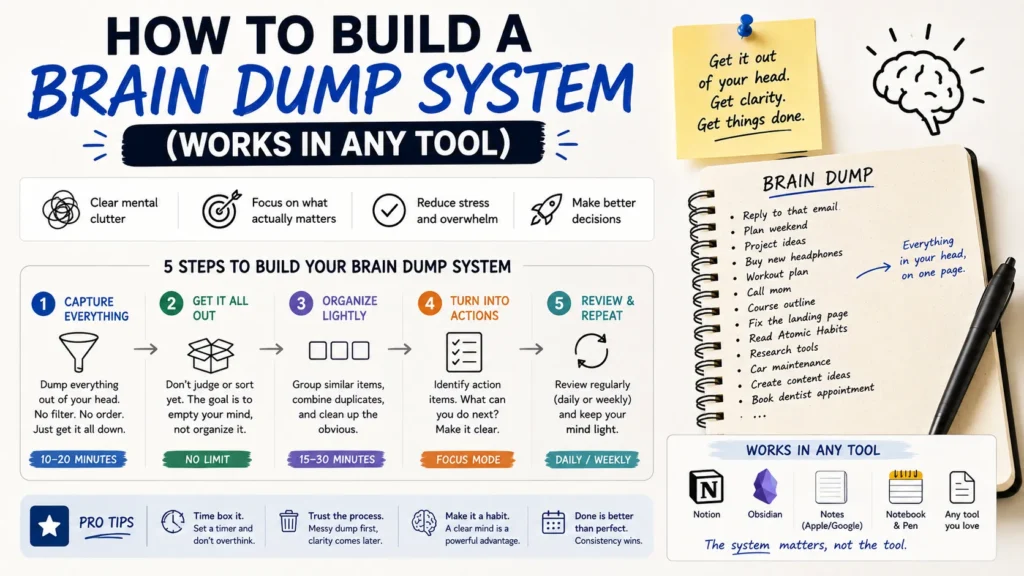
A brain dump system fixes that. It’s not a specific app and it’s not a personality type thing, it’s a habit: one place where anything goes the moment you think of it, and a separate step later where you actually deal with it. Below is a version of the system that works whether you’re using Notion, Apple Notes, a Field Notes notebook, or nothing more than the Reminders app you already have open.
What a brain dump system actually is
Most people who try this fail for one of two reasons. Either capturing something takes too many steps, so they skip it in the moment and the thought is gone. Or they try to decide “where does this go?” while they’re still mid-thought, which turns a five-second jot into a five-minute filing project, and eventually they stop bothering.
The fix is separating two jobs that people usually smash together: capture and processing. Capture should take seconds and require zero decisions. Processing happens later, on a schedule, when you’re not also trying to remember what you were doing before the thought interrupted you.
- Read Also: Best Second-Brain Systems Compared: Notion, Obsidian, and Logseq
- Read Also: How to Build a Weekly Planning System That Actually Sticks
The four-stage system
1. Capture: one inbox, no filing
Pick a single place that catches everything, unsorted. This matters more than which app you pick. A voice memo, a note on your phone’s lock screen widget, a running Google Doc, the back of a receipt in your pocket, it doesn’t matter, as long as it’s the one place you actually reach for without thinking.
The only rule: write it down raw. No tags, no folders, no “is this a task or an idea” debate. That’s a later problem.
2. Process: a scheduled sort, not a constant one
Set aside time, daily if your inbox fills up fast, two or three times a week if it doesn’t, to go through everything you dumped and ask one question per item: what is this, and does it need an action?
Four buckets cover almost everything:
| Bucket | What goes here |
Where it lives after processing
|
| Do | Anything with a next action |
Your task list or calendar
|
| Reference | Info worth keeping but no action needed |
Notes or a wiki page
|
| Someday/Maybe | Ideas worth revisiting, not now |
A running backlog list
|
| Trash | Most things, honestly | Deleted |
That last row surprises people the first time they process a dump. Roughly half of what felt urgent at 2am reads as irrelevant by Thursday. That’s not a failure of the system, it’s the system working.
3. Organize: add structure after, never during
Once something’s been triaged, give it a home. This might be as simple as a couple of Notion pages, or as basic as three folders in Apple Notes. Resist the pull to build an elaborate tagging scheme before you’ve processed a single item. A six-category system gets used. A twenty-category system gets abandoned by week three, and you end up back at square one with a pile of unsorted notes and a folder structure nobody opens.
4. Reflect: a weekly check-in
Systems like this decay quietly. You stop emptying the inbox, the Someday/Maybe list turns into a graveyard, and eventually the whole thing just becomes another notes app you feel vaguely guilty about. A short weekly review heads that off:
- Skim Someday/Maybe. Anything become relevant? Anything gone stale enough to cut?
- Check whether the inbox actually got emptied this week, not just glanced at.
- Look for repeats. If you keep dumping the same kind of thing (client emails you need to follow up on, recurring errands), that’s a sign you need a dedicated bucket, or an automation, for that category specifically.
Setting it up in whatever tool you already use
You don’t need to switch apps to do this. The four stages above are deliberately generic so they map onto almost anything.
- Notion or Obsidian: one Inbox database or page as the capture point, a status property (Do, Reference, Someday, Trash) to process, and separate databases or pages for the organized material.
- Apple Notes or Google Keep: a single pinned note as your inbox. During processing, move lines out into other notes or folders, then clear the inbox note.
- A task manager like Todoist or Things: an Inbox project everything lands in by default. Processing is just triaging into real projects, or deleting.
- Paper: a dedicated notebook section reserved only for the dump. Processing means transcribing or checking things off during your weekly review.
- Automation-heavy setups: if you already use something like Zapier or N8N, the inbox can be a form, a specific Slack channel, or an email address that auto-routes into a database.
A quick example
Say you’re a freelancer juggling three clients. Over a Tuesday you jot into your phone’s Inbox note: “ask Dana about the invoice,” “cool headline idea for the Q3 newsletter,” “look into that new email tool,” and “buy dog food.” On Thursday’s processing session, “ask Dana” becomes a task due Friday, the headline idea goes into a Someday/Maybe doc for content ideas, “look into email tool” gets fifteen minutes on the calendar next week, and “buy dog food” gets deleted because you already went to the store Wednesday. None of that required a complicated app. It required a place to dump and a scheduled ten minutes to sort.
Common mistakes that kill the habit
- Treating the inbox as permanent storage. If you stop emptying it, it stops working as a capture tool and starts working as anxiety in list form.
- Over-categorizing at capture time. The whole point is that capture is fast. If you’re deciding folder placement while jotting something down, you’ve merged the two steps back together.
- Skipping the weekly review. This is the step people cut first when busy, and it’s the one that keeps the whole system from rotting.
- Chasing the perfect app instead of starting. A basic note pinned to your home screen today beats a beautifully designed Notion template you get around to building next month.
Frequently Asked Questions
What’s the difference between a brain dump and a to-do list?
A to-do list only holds things you’ve already decided are tasks. A brain dump catches everything, tasks, ideas, half-formed thoughts, before you’ve sorted out what it even is.
How often should I do a brain dump?
Capture happens continuously, any time a thought shows up. Processing is the scheduled part, daily works well for people with a lot flowing through, two or three times a week is plenty for lighter use.
Do I need a special app for this?
No. The system is the four stages, not the tool. Apple Notes, a Notion database, and a paper notebook all work fine as long as you actually use whichever one you pick.
Can I combine a brain dump with GTD or another productivity method?
Yes, and a lot of people already do without naming it that. The capture-then-process split described here is essentially a lighter version of the “capture” and “clarify” stages from Getting Things Done, adapted to work without needing to adopt the whole methodology.
- Read Also: A Task System for People Who Have Tried Every App and Nothing Works
- Read Also: Digital Habit Tracking Without Relying on Streaks
Where to go from here
Pick one tool, the one that’s already open on your phone most, and pin a blank note or page to it right now. Give yourself permission to dump into it messily for a week before worrying about categories at all. The system gets built by using it badly at first, not by planning it perfectly.
