
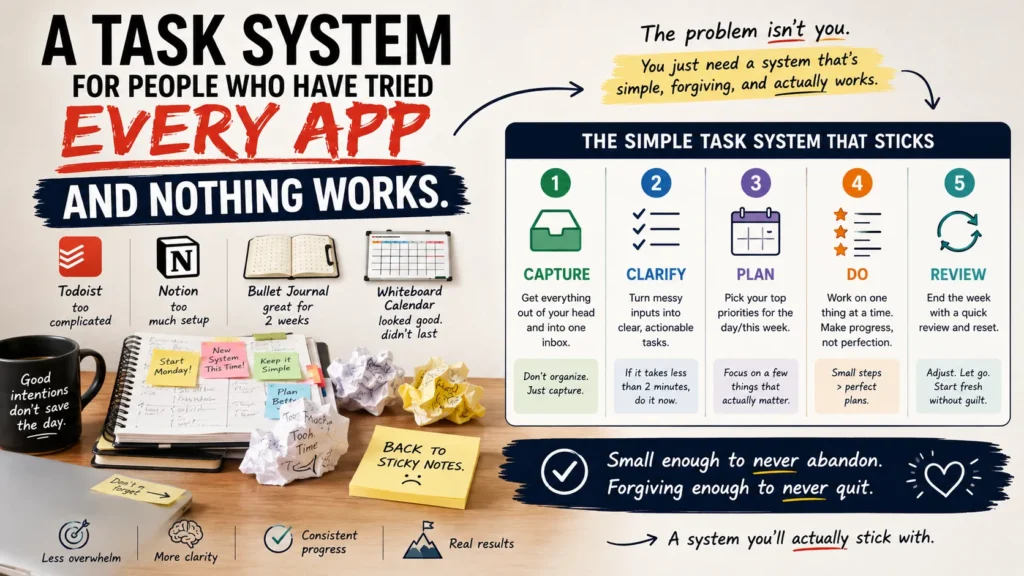
You’ve probably downloaded every productivity app out there. Todoist, Notion, maybe even tried a bullet journal. It feels amazing… until a few weeks later, when you’re back to covering your laptop with sticky notes. Been there?
The problem isn’t your discipline. The best task management system isn’t about finding the perfect app. It’s about creating a simple system that’s easy to keep using, even after a messy week. That’s exactly what you’ll learn below.
Why Do Most Productivity Apps Fail Within a Month?
Most task apps are designed by people who love task apps. That sounds like a joke, but it explains a lot. Features pile up because they’re possible to build, not because they solve a problem you actually have. Custom fields, tags, sub-projects, recurring task logic, four different views of the same list. All of it needs upkeep, and upkeep is exactly what falls apart during a busy week.
There’s also a quieter issue: most systems assume you’ll use them every single day, at roughly the same time, with roughly the same energy. Real life doesn’t work that way. You’ll have days where you get eight things done before 9 a.m. and days where checking your phone feels like a chore. A system that only works on the good days isn’t a system. It’s a hobby.
The fix isn’t a better app. It’s fewer moving parts.
- Read Also: Best Second-Brain Systems Compared: Notion, Obsidian, and Logseq
- Read Also: How to Build a Weekly Planning System That Actually Sticks
What Does a Task System That Actually Works Look Like?
Strip it down and a working system needs exactly three things: a single place to capture tasks, a way to decide what matters today, and a review habit short enough that you’ll actually do it. That’s it. Everything else, colors, tags, automations, is optional decoration you can add later, if ever.
One Inbox, Not Five
Pick one place. A notes app, a paper notebook, one Trello board, whatever. The tool matters less than the rule: every task, idea, and half-formed reminder goes into that one place the second it crosses your mind. Not into your email drafts, not into a sticky note, not into “I’ll remember it.” One inbox.
This single change fixes more productivity problems than any feature ever will, because the reason tasks slip through the cracks usually isn’t forgetfulness. It’s that you wrote it down in three different places and checked none of them consistently.
A Daily Three, Not a Daily Fifty
Each morning, or the night before, pull three tasks out of your inbox and put them somewhere separate: a sticky note, the top of a page, a “Today” list. Just three. Not because you can only do three things in a day, but because three is small enough to finish, and finishing builds the habit that keeps the whole system alive.
Anything beyond those three is a bonus. If you clear them and have energy left, grab more from the inbox. If you don’t, the day wasn’t a failure. You did the thing that mattered.
A Five-Minute Weekly Reset
Once a week, spend five minutes going through the inbox. Delete what’s no longer relevant, group anything related, and flag two or three tasks that matter for the week ahead. That’s the entire review. No elaborate retrospective, no color-coded quadrant chart. Five minutes, once a week, is sustainable in a way that a daily 30-minute planning ritual never will be.
Comparing System Weight: Where Most People Should Start
| System type | Setup time | Daily upkeep | Best for |
Common failure point
|
| Paper notebook, one list | 2 minutes | Under 1 minute | People who abandon apps easily |
Losing the notebook
|
| Single app, one list (Apple Notes, Google Keep) | 5 minutes | 1–2 minutes | People who want search + sync |
Adding extra lists over time
|
| Full project management app (Notion, ClickUp, Asana) | 1–3 hours | 10–20 minutes | Team projects, complex workflows |
Overbuilding before daily use is a habit
|
| Bullet journal method | 15–30 minutes | 5 minutes | Visual thinkers who like handwriting |
Perfectionism about layout
|
If you’ve failed at three or more apps already, start in the top row. You can always add complexity once the habit itself is solid, though most people never need to.
How Do You Stop Falling Off the System After a Few Weeks?
The honest answer: you don’t, entirely. Everyone misses days. The difference between people who keep a system for years and people who abandon one every six weeks is what happens the day after a miss.
Build in a rule ahead of time: missing a day costs you nothing except that day. You don’t owe the system a make-up session, and you don’t need to reorganize everything before you’re “allowed” to start again. Open the inbox, pick three tasks, keep going. Systems that survive are the ones designed to tolerate a bad week, not the ones that punish you for having one.
It also helps to separate the system from the tool. If Notion burns you out, move the exact same three-part structure into a notebook. The rules are what make it work, not the software.
What About Automation and AI Tools? Do They Actually Help?
Sometimes, but only after the manual version is already working. Automating a task system before you’ve built the habit just gives you a more elaborate way to ignore your tasks. Once the daily-three habit is solid, a simple automation, like a recurring reminder or a template that auto-populates your weekly reset, can shave a minute or two off setup. That’s a real benefit. Just don’t let automation become the reason you keep tinkering instead of doing the tasks.
- Read Also: How to Build a “Brain Dump” System (Works in Any Tool)
- Read Also: Digital Habit Tracking Without Relying on Streaks
Frequently Asked Questions
What’s the best task management system for someone who has ADHD and has failed at every app?
Start with the smallest possible version: one inbox and a daily three, on paper if apps have historically added friction. Fewer decisions and less screen-switching tend to matter more than any specific feature.
How many tasks should be on a daily to-do list?
Three core tasks, plus optional extras once those are done. Long daily lists are one of the main reasons people quit their system within a month.
How do I get back on track after falling off a productivity system for weeks?
Skip the full reset. Open your inbox, pick three tasks for today, and go. Treating a lapse as a reason to rebuild everything is usually what causes the next lapse.
What’s the difference between a to-do list and a task management system?
A to-do list is just a container for tasks. A system also includes a capture method, a daily filter (like the daily three), and a review rhythm. Those are the parts that keep the list from turning into a graveyard of untouched items.
The Takeaway
You don’t need a new app. You need fewer parts: one inbox, three tasks a day, five minutes a week to reset. If it’s simple enough to survive a bad week, it’s simple enough to still be running in a year, which is more than most of the apps in your download history can say.
