
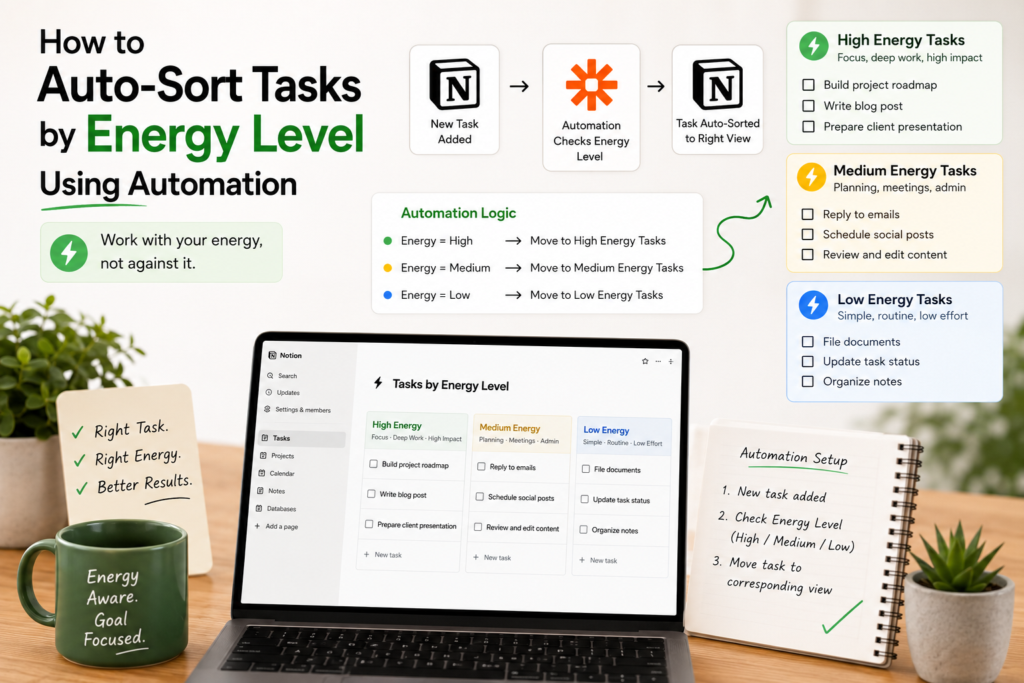
Most task managers sort by due date or priority. Almost none of them ask the question that actually determines whether you’ll get something done today: how much energy does this task require, and how much do you have right now?
Energy-based task sorting fixes that mismatch. Instead of staring at a flat list and picking whatever feels least overwhelming, you tag tasks by the mental or physical energy they demand, then automate the sorting so the right tasks surface at the right moments. Here’s how to actually build it.
Why sort by energy instead of priority
Priority tells you what matters. It doesn’t tell you what you’re capable of doing right now. A high-priority task that needs deep focus is a bad match for 4pm on a day you barely slept, and a low-effort task like replying to a quick email is a waste of your sharpest morning hours.
Energy-based sorting solves a scheduling problem that priority-based sorting can’t: it matches the demand of a task to your current capacity, not just its importance.
Step 1: Define your energy tiers
Before any automation can sort tasks, you need a consistent way to label them. Three tiers is usually enough — more than that adds friction without adding much benefit.
A simple starting framework:
- High energy — deep work, problem-solving, writing, anything requiring sustained focus or creativity
- Medium energy — routine work that still needs attention: replying to emails, reviewing documents, scheduling
- Low energy — quick, low-stakes tasks: filing, simple data entry, tasks you could do while distracted
Add an “Energy Level” property to your task database (Notion, ClickUp, Airtable, or whatever you use) with these three options. This single field is what every automation below will key off of.
Step 2: Tag tasks as you create them
The system only works if tasks get tagged consistently. Two ways to make that happen without adding manual work:
Build tagging into your capture process. If you use a template for new tasks, add the Energy Level field to the template with a default value, so you’re prompted to set it (or override it) every time you create a task, rather than remembering to add it later.
Use conditional automation to pre-tag by category. If certain task types are reliably high or low energy — say, everything in your “Writing” project is high energy, everything tagged “Admin” is low energy — you can automate the tag itself: when a task is created in a given project or with a given tag, automatically set its Energy Level property. This removes the tagging step entirely for predictable task types.
Step 3: Automate the sorting and surfacing
This is where the real value shows up — not just labeling tasks, but getting the right tasks in front of you at the right times, without manually filtering every time.
Time-of-day views. Many people’s energy follows a predictable daily pattern. Set up a recurring automation (or a saved, filtered view) that surfaces high-energy tasks in the morning and shifts to medium- or low-energy tasks later in the day. If your task tool supports scheduled automations, you can have it move flagged high-energy tasks to the top of your list first thing each morning.
Energy-matched daily digest. Rather than one big task list, automate a daily message (Slack, email, or a Notion page) that groups your open tasks by energy tier. Instead of scanning a mixed list and deciding what to tackle, you open the digest and pick from whichever tier matches how you’re feeling.
Low-energy fallback list. Automate a filtered view or a scheduled reminder that surfaces only low-energy tasks, and check it on the afternoons or days you know your focus is limited. Having this ready means a low-energy day doesn’t turn into a zero-output day — you still make progress, just on lighter work.
Auto-reschedule high-energy tasks that get skipped. If a high-energy task sits untouched for a few days, it’s often a sign it keeps getting passed over because the right window of focus hasn’t shown up. An automation that flags or reschedules stale high-energy tasks — bumping them to the next likely high-focus day — keeps them from silently falling off your radar.
Step 4: Adjust the system based on what actually happens
Energy tiers are a starting hypothesis, not a fixed truth. After a couple of weeks, look at which tasks consistently get skipped or delayed, and check whether they’re mistagged. A task you keep avoiding at “medium energy” might really be a high-energy task in disguise. Treat the tags as adjustable, and let your automation reflect reality rather than your first guess.
Keeping it simple
The most common failure mode with energy-based systems isn’t the concept — it’s over-engineering it. A three-tier tag, a couple of filtered views, and one automated digest will get you most of the benefit. You don’t need a fourth energy tier, custom scoring formulas, or a dozen automation rules before you’ll notice a difference. Start with the smallest version that changes how you pick your next task, and only add complexity once you’ve felt where the simple version falls short.
Final thoughts
Sorting by energy instead of just priority or due date turns your task list from a static queue into something that actually adapts to your day. The automation isn’t the hard part — tagging consistently is. Get that right, and a few simple rules do the rest of the work for you.
