
There’s a specific kind of stuck that has nothing to do with laziness. You open your laptop, look at the same three tasks you’ve been avoiding for two days, and close it again. Nothing feels wrong exactly, you just can’t make yourself move.
This isn’t a motivation problem. It’s a decision-fatigue problem wearing a motivation costume. Every unfinished task on your list carries a hidden cost: you have to decide what it means, where to start, and whether now is even the right time. Multiply that by ten open tabs and a Notion board nobody’s updated in a week, and it’s no surprise your brain picks “none of the above.”
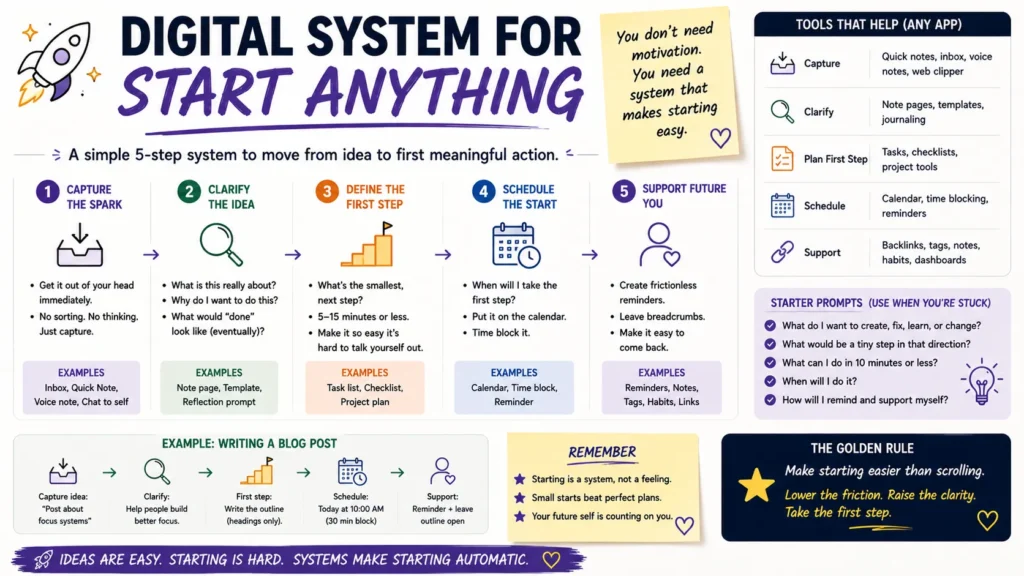
A digital system for low motivation days works differently than a normal productivity setup. It doesn’t ask you to feel ready. It removes the moment where you’d have to decide anything at all, so starting stops being a choice and just becomes the next click.
Why Do Normal To-Do Apps Fail on Low-Energy Days?
Most task managers are built for a version of you that already has momentum. They assume you’ll open the app, scan twenty items, prioritize on the fly, and pick something. That’s three decisions before you’ve done a single minute of work.
On a low-energy day, that front-loaded thinking is exactly what shuts you down. Your brain isn’t short on ambition, it’s short on bandwidth. A friction-heavy tool doesn’t fix that. It just gives your avoidance a longer runway.
The fix isn’t a better list. It’s a system that hands you one obvious next action, with the deciding already done in advance.
- Read Also: Managing Time Blindness with Digital Tools: A Step-by-Step Guide
- Read Also: How to Stop Losing Tasks When You Have ADHD (Any App)
What Does a No-Motivation Digital System Actually Look Like?
Think of it less as an app and more as a chain of small, boring defaults. Each piece removes one decision so the next one gets easier.
1. A single “today” surface, not five
Pick one app for the actual day, whether that’s a Notion page, Todoist, or a plain note. Everything else, your calendar, your inbox, your project board, feeds into it. You should never have to check four places to know what’s next.
2. Tasks written as actions, not projects
“Finish the report” is a wall. “Open the report doc and write one paragraph” is a door. Rewrite anything vague the moment you notice it’s vague, ideally the night before, when you have more capacity to think clearly.
3. A timer instead of a mood check
Set five minutes. Not thirty, not sixty. Five minutes is short enough that your brain won’t fight it, and long enough that momentum usually takes over once you’re in.
4. An automatic “smallest version” fallback
Every task on your low-energy list should have a scaled-down twin. If “write the article” feels impossible, the fallback is “write one sentence.” You’re not lowering your standards, you’re giving yourself a ramp instead of a wall.
5. Automation that removes the setup step
This is where tools like Notion databases, Zapier, or n8n earn their keep. A recurring automation that pulls tomorrow’s top three tasks into a single card at 8 p.m., or a button that logs a completed task without you opening three separate apps, takes the administrative tax off a day when you have none to spare.
How Do You Build This Without Overengineering It?
Ready to build. Don’t fall for the mistake of designing an elaborate five-app pipeline before you’ve tested it against a single bad day. Start with the smallest version, then automate the parts that keep repeating.
| Step | Manual version (start here) |
Automated version (add later)
|
| Capture tomorrow’s tasks | Write 3 items on paper or a sticky note tonight |
n8n workflow pulls tagged tasks from Notion into a “Tomorrow” view at 8 p.m.
|
| Reduce decision load | Rewrite each task as a one-line action |
Notion template with pre-filled “smallest version” field for every task
|
| Start | Set a phone timer for 5 minutes |
Zapier trigger starts a focus timer when you mark a task “in progress”
|
| Track without judgment | Check a box, nothing else |
Automated daily log posts a one-line summary to a private Slack channel or journal database
|
Notice the manual column works fine on its own. Automation isn’t the point. It’s a way to remove the same tiny decision every single day once you know it’s worth keeping.
What If Even the Timer Feels Like Too Much?
Some days five minutes is still five minutes too many. On those days, the system’s job shifts from “get something done” to “make tomorrow slightly easier.” That’s still a win.
A few options that count, even on the worst days:
- Move one item from your inbox into a folder, nothing else
- Reply to a single message you’ve been avoiding
- Write down what’s making the task feel heavy, so future-you doesn’t have to guess
The goal isn’t to trick yourself into productivity. It’s to keep the chain unbroken so restarting tomorrow doesn’t mean starting from zero.
Does This Actually Work Long-Term, or Just for One Bad Day?
A system built only for emergencies tends to get abandoned the moment things feel normal again. The ones that stick treat low-motivation days as a regular part of the calendar, not an exception to plan around.
That means checking in with the system even on good days. A Sunday-night five-minute review of what worked and what got skipped tells you more about your actual capacity than any productivity book will. Adjust the smallest-version tasks, prune the automations that turned into noise, and keep the parts that quietly did their job without you noticing.
Frequently Asked Questions
What’s the fastest way to start when I have zero motivation?
Set a timer for five minutes and commit to one task’s smallest possible version, nothing more. The short window removes the pressure of finishing, and starting is usually the hardest part.
Can Notion alone handle a low-motivation system, or do I need extra tools?
Notion covers capture and task storage well on its own. Adding Zapier or n8n only makes sense once you notice yourself repeating the same manual step daily, like moving tasks into a “Tomorrow” view.
Is this the same thing as the “2-minute rule”?
It’s related but not identical. This system is built for tasks that aren’t quick, but still need a low-friction entry point.
Should I use this system every day or only on bad days?
Run it every day. Reserving it only for rough days means rebuilding the habit each time one hits, which defeats the purpose of having a default in the first place.
- Read Also: Breaking Down Big Projects Without Overwhelm
- Read Also: Reminder Systems That Actually Work for ADHD Brains
The Bottom Line
Motivation was never going to show up reliably, and building a system around waiting for it just adds another task to the pile. A digital system for low-energy days works because it removes deciding, not because it removes difficulty. Start with paper and a five-minute timer this week, and only bring in automation once you’ve found the step that’s worth repeating on autopilot.
