
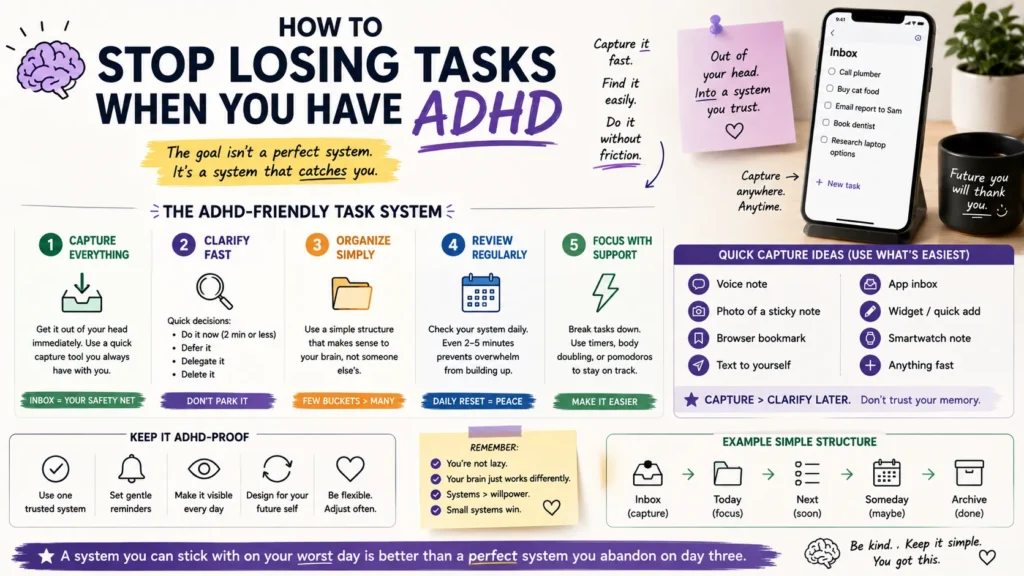
Somewhere in your phone right now, there’s probably a task you swore you’d remember without writing down. Maybe it’s a reply you owe someone, a bill, a thing your kid asked for last Tuesday. If you have ADHD, that task didn’t get lost because you’re careless. It got lost because your brain treats “out of sight” as “doesn’t exist yet.”
This isn’t really an app problem, even though app store reviews are full of ADHD folks blaming the software. You can hop from Todoist to Notion to a paper planner to Apple Reminders and lose tasks in every single one, because the failure point is almost never the tool. It’s the handoff between the moment a task enters your head and the moment it lands somewhere permanent.
Below is a system that works whether you’re using a $50-a-year app, a free one, or a stack of sticky notes.
Why Do People With ADHD Lose Tasks in the First Place?
ADHD affects working memory, the part of your brain that holds information active while you’re using it. Neurotypical brains can juggle a thought for a few minutes without effort. ADHD brains often lose it in seconds, especially if something else grabs attention in between: a notification, a smell, a random thought about dinner.
A few specific patterns show up over and over:
- The task never left your head. You thought about writing it down. Thinking about it felt like enough. It wasn’t.
- You wrote it somewhere temporary. A sticky note, the notes app, a random Slack message to yourself, and then it got buried under forty other things.
- You wrote it down correctly, but never looked at that list again. This is the most common one, and it’s rarely talked about. Capture isn’t the hard part for most ADHDers. Review is.
- The task was written down vaguely. “Follow up with landlord” doesn’t tell your brain what to actually do, so it gets skipped every time you scan the list.
Task paralysis makes all of this worse. When a list has twelve unsorted items, an ADHD brain often can’t pick where to start, so it picks nothing, and the whole list quietly becomes background noise.
- Read Also: Managing Time Blindness with Digital Tools: A Step-by-Step Guide
- Read Also: Breaking Down Big Projects Without Overwhelm
What Actually Fixes This (Regardless of App)
Cut the Number of Capture Points to One
If you’re jotting tasks in your notes app, a notebook, three group chats, and your email drafts folder, you don’t have a task system. You have five half-systems, and half-systems lose things. Pick a single place tasks are allowed to live. It genuinely does not matter which app; what matters is that it’s the only one.
Capture Immediately, Not “In a Minute”
The gap between thinking of a task and writing it down is where most tasks die. If your capture tool takes more than about five seconds to open (unlocking your phone, finding the app, tapping through a menu), you will skip it half the time. Voice memos, a widget on your home screen, or a physical notepad on your desk all cut that friction down. Automation tools help here too: a lot of ADHD users set up a quick capture flow with something like Zapier or n8n so a text message, a Slack DM, or even a voice note automatically becomes a task line item, no manual typing required.
Make Every Task Start With a Verb
“Landlord” is not a task. “Text landlord about the leaking faucet” is. Vague entries get skipped because your brain has to do extra work just to figure out what “landlord” means before it can act, and ADHD brains routinely skip that extra step. Rewrite tasks the moment you capture them so the very first word tells you what to physically do.
Build a Forced Daily Review
This is the piece almost everyone skips, and it’s the one that matters most. A task list you never open is just a graveyard. Set a recurring alarm. Same time every day works better than “whenever I remember.” Spend two minutes scanning the list. You’re not trying to do everything on it. You’re just making sure nothing silently expires.
Separate “Someday” From “Today”
Long lists overwhelm ADHD brains into inaction. Keep a short list of what actually needs doing today (three to five items, no more) and a separate holding area for everything else. Anything estimated at ten minutes or under can also just get done the second it’s captured, instead of ever making it onto a list at all. That alone eliminates a surprising chunk of “lost” tasks.
Comparing Common Capture Methods for ADHD
| Method | Friction to Capture | Built-In Review Prompt | Best For |
| Voice memo / voice-to-text | Very low | No, needs a separate review habit |
Capturing on the move, driving, walking
|
| Physical notepad | Low | No |
People who lose focus staring at screens
|
| Task app with daily reminder | Low-medium | Yes, if reminders are set |
People who already live on their phone
|
| Shared notes app (no structure) | Low | No |
Rarely works alone; needs pairing with a review habit
|
| Automation flow (text/voice → task app) | Very low | Depends on app |
People juggling multiple input channels
|
No single row in that table is “the answer.” The method that survives long-term is whichever one you’ll actually keep opening after the first week’s excitement wears off.
How to Pick (or Fix) an App Without Overhauling Your Life
You don’t need to switch apps to fix a lost-task problem, and doing so is often a form of productive-feeling procrastination. Before you download anything new, add these two things to whatever you’re already using:
- A daily recurring alarm that forces a review, not just a notification you can dismiss without reading.
- A rule that nothing sits in a “temporary” spot (no sticky notes, no notes-app parking lot) for more than a day before it either gets done or moved into the real list.
If your current app genuinely can’t support a recurring review reminder, that’s a legitimate reason to switch. Everything else is usually a workflow problem dressed up as a tool problem.
Frequently Asked Questions
Why do I keep forgetting tasks even when I write them down?
Writing a task down solves capture, not review. If you never look at the list again, or the list is long and unsorted, your brain treats it the same as never having written it at all. Pair every written task with a scheduled time to look at the list.
What’s the best task app for ADHD?
There isn’t one best app. That’s one of the more misleading ideas floating around ADHD productivity content. What matters more than the app is a low-friction capture step and a forced daily review. A simple app with both of those beats a feature-heavy app with neither.
Is losing tasks constantly a sign of untreated ADHD, or just disorganization?
Occasional forgetfulness happens to everyone. A consistent pattern of losing tasks despite genuinely trying different systems is more specific to how ADHD affects working memory and task initiation. If it’s affecting work, relationships, or daily functioning, it’s worth bringing up with a doctor or therapist rather than only trying app after app.
Can automation tools like Zapier or n8n actually help with this?
Yes, particularly for the capture step. Setting up a flow where a text message, voice note, or email automatically drops into your task app removes a manual step that’s easy to skip. It won’t fix the review habit on its own, though. That part still has to be built manually.
- Read Also: Reminder Systems That Actually Work for ADHD Brains
- Read Also: A Digital System for Days When You Can’t Start Anything
The Takeaway
Losing tasks isn’t a willpower failure, and it isn’t really a sign you picked the wrong app. It’s what happens when there’s no reliable bridge between the moment a thought shows up and the moment it lands somewhere you’ll actually see it again. Fix the capture step, fix the review step, and most ADHD task-loss problems shrink dramatically, no matter what’s running on your home screen.
